The Shot Explorer: See Why Every Golf Shot Flies the Way It Does | Chris Brook

The Shot Explorer · for Windows and Mac

See the invisible.

Every golf shot is decided in less than half a thousandth of a second. The Shot Explorer shows you what happened in that moment, why the ball flew the way it did, and exactly what to change.

  • Pay once, keep it
  • Windows and Mac
  • Use it on two computers
  • Free updates

“Most golfers have been told what their swing should look like. Very few have been shown what it actually does to the ball.”

CHRIS BROOK · TRACKMAN MASTER PROFESSIONAL
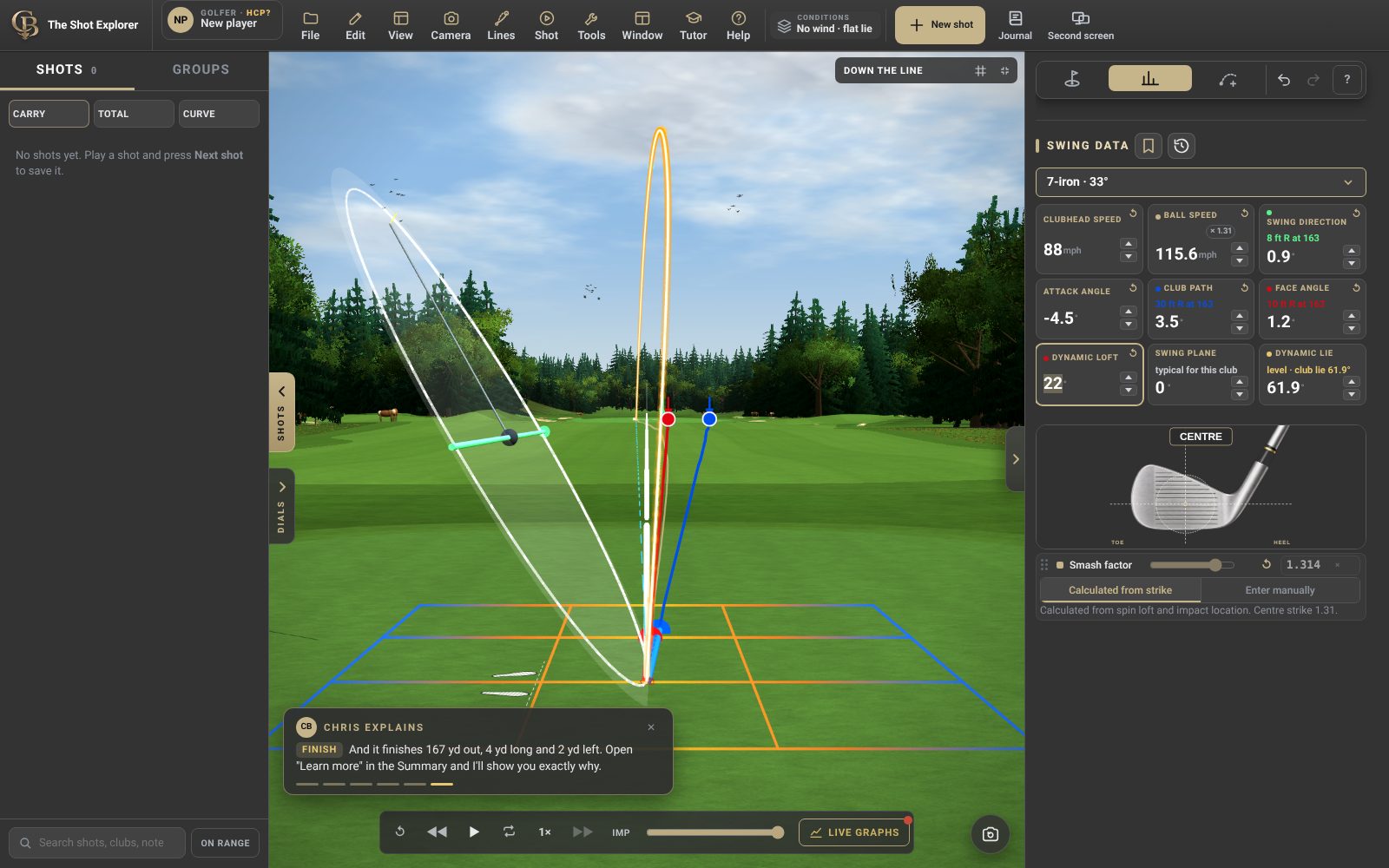
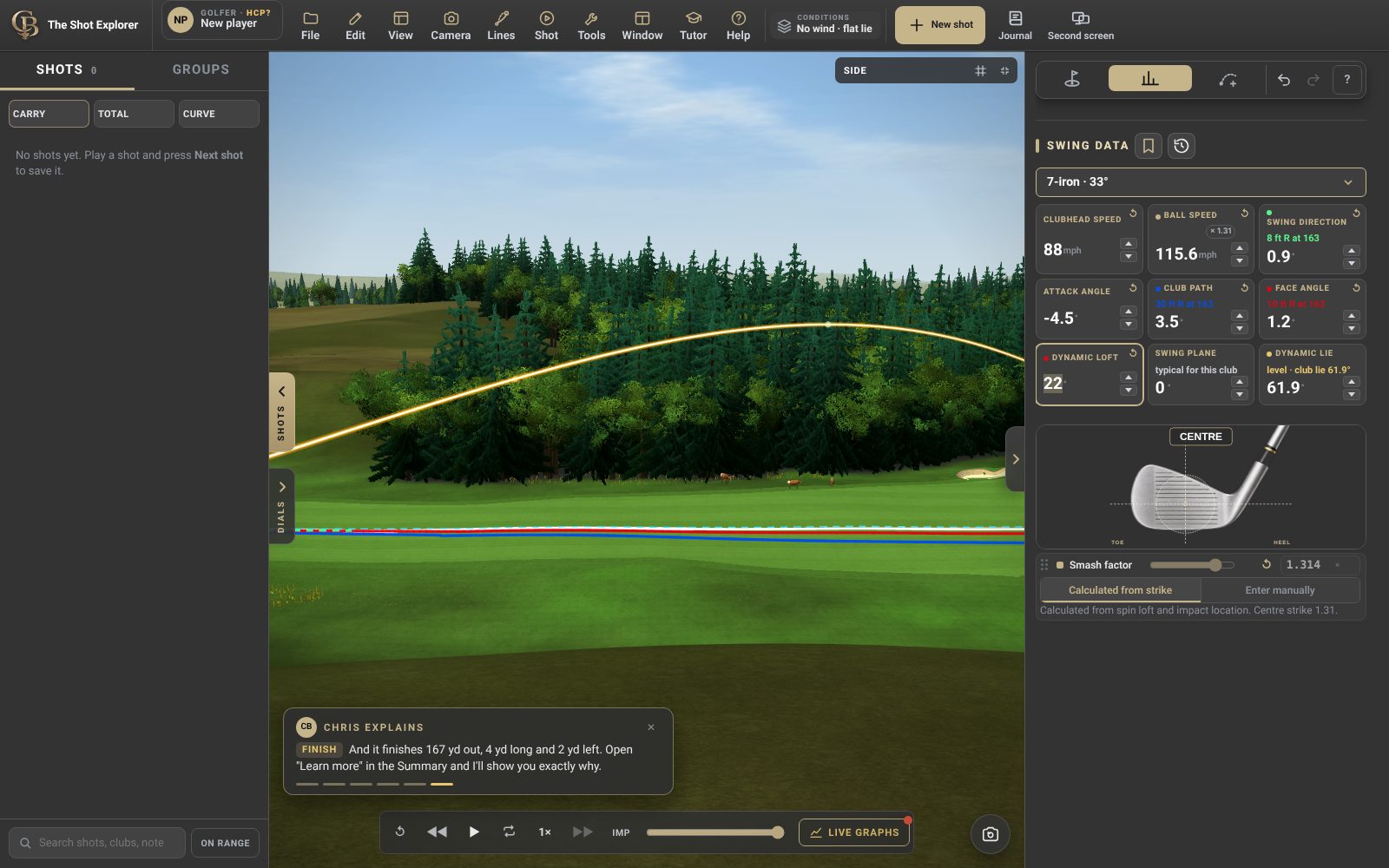
Chris explainsStarts 0.9° right, curves 6 yd left.
Finishes 4 yd long, 2 yd left.
Spin axis−4.8° · a gentle draw
The Shot Explorer
The Shot Explorer showing a 7-iron draw in 3D from down the line, with the swing data panel on the right
  • Built by a coach31 years teaching tour professionals, internationals and club golfers.
  • Real ball-flight physicsDrag, lift, spin and the air, worked out shot by shot.
  • Plain EnglishEvery shot explained in words, not just numbers.
  • Yours to keepNo subscription. Works offline once it’s set up.
0.0004seconds: about how long the ball stays on the clubface

The problem

You can see where the ball went. You can’t see why.

In that tiny moment, the angle of the face, the direction of the swing, the loft, the speed and where you hit it on the face all combine to set the ball’s speed, launch and spin. After that, the ball is on its own.

A launch monitor gives you the numbers. It doesn’t show you how they fit together, which one really caused the miss, or what to change first. So most golfers guess, and most guesses make the next shot worse.

A common example. Many golfers still believe the ball starts where the swing is going. It doesn’t. It starts mostly where the face points, and curves away from the path. Get that backwards and every fix you try sends the ball the wrong way.

The Shot Explorer lets you see it, so you never have to take anyone’s word for it again.

How it works

Three steps from “why?” to “that’s it.”

No launch monitor needed. Type in numbers from your own sessions, or simply explore.

  1. Set the strike

    Choose a club and set the speed, face angle, club path, attack angle, loft and where the ball meets the face. Use the dials or type the numbers in.

  2. Watch it fly

    See the shot fly in 3D from behind, above, the side or the landing area, with the face, path and spin axis drawn on the screen as it happens.

  3. Understand it

    The program explains the shot in plain English, and the Shot Tuner tells you what to change, and by how much, to hit the shot you want.

What’s inside
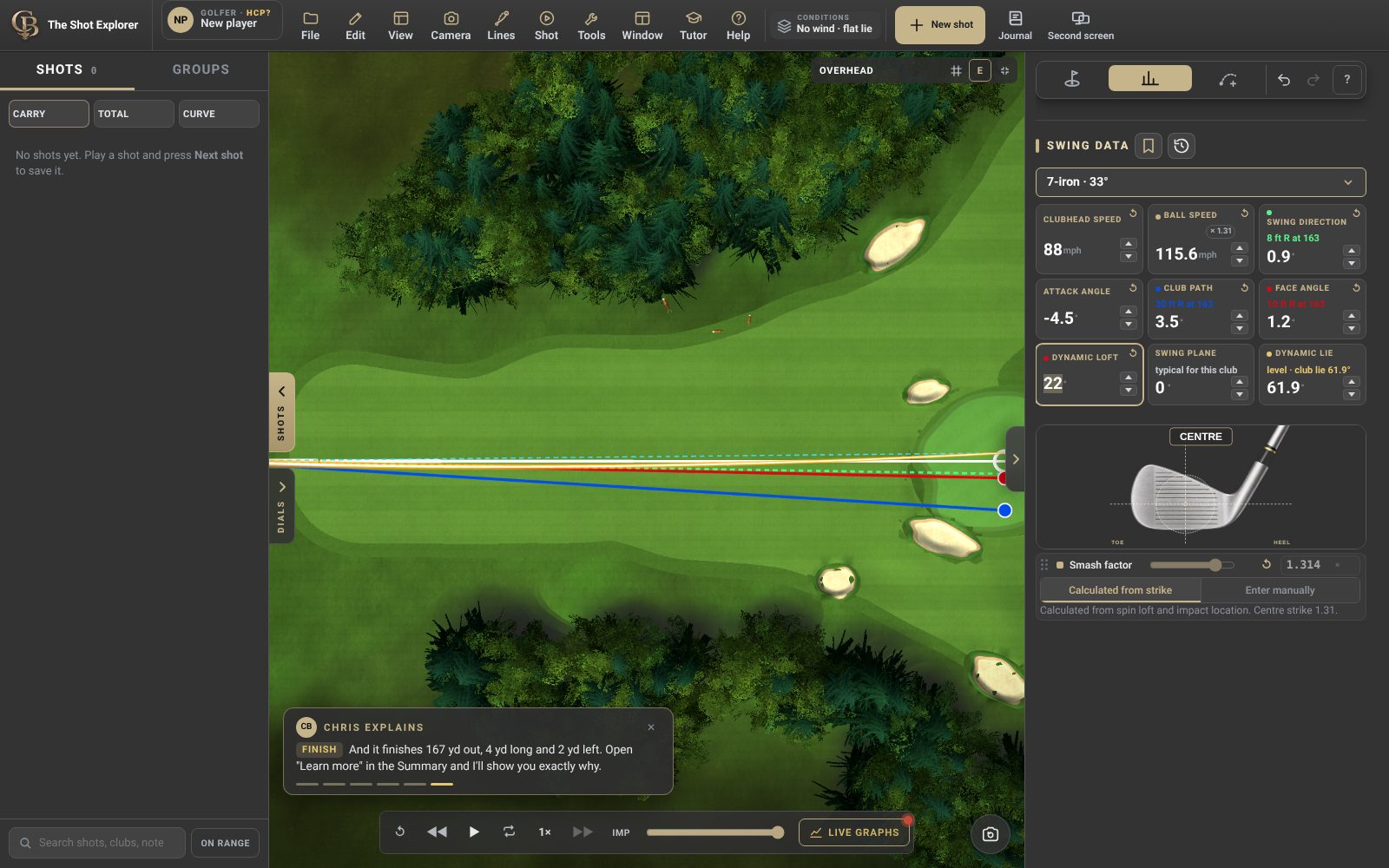
Everything that shapes a golf shot, in one place.

Overhead view of a shot curving towards the target on a tree-lined hole

See every shot in 3D, from every angle

Watch the ball leave the face and follow it all the way to where it stops. Switch between down the line, overhead, side-on and the landing area, slow it down, replay it and loop it.
  • The face, the path and the spin axis drawn on screen
  • Carry, total, curve, height and where it finishes
  • A second screen, so your student sees the shot while you work
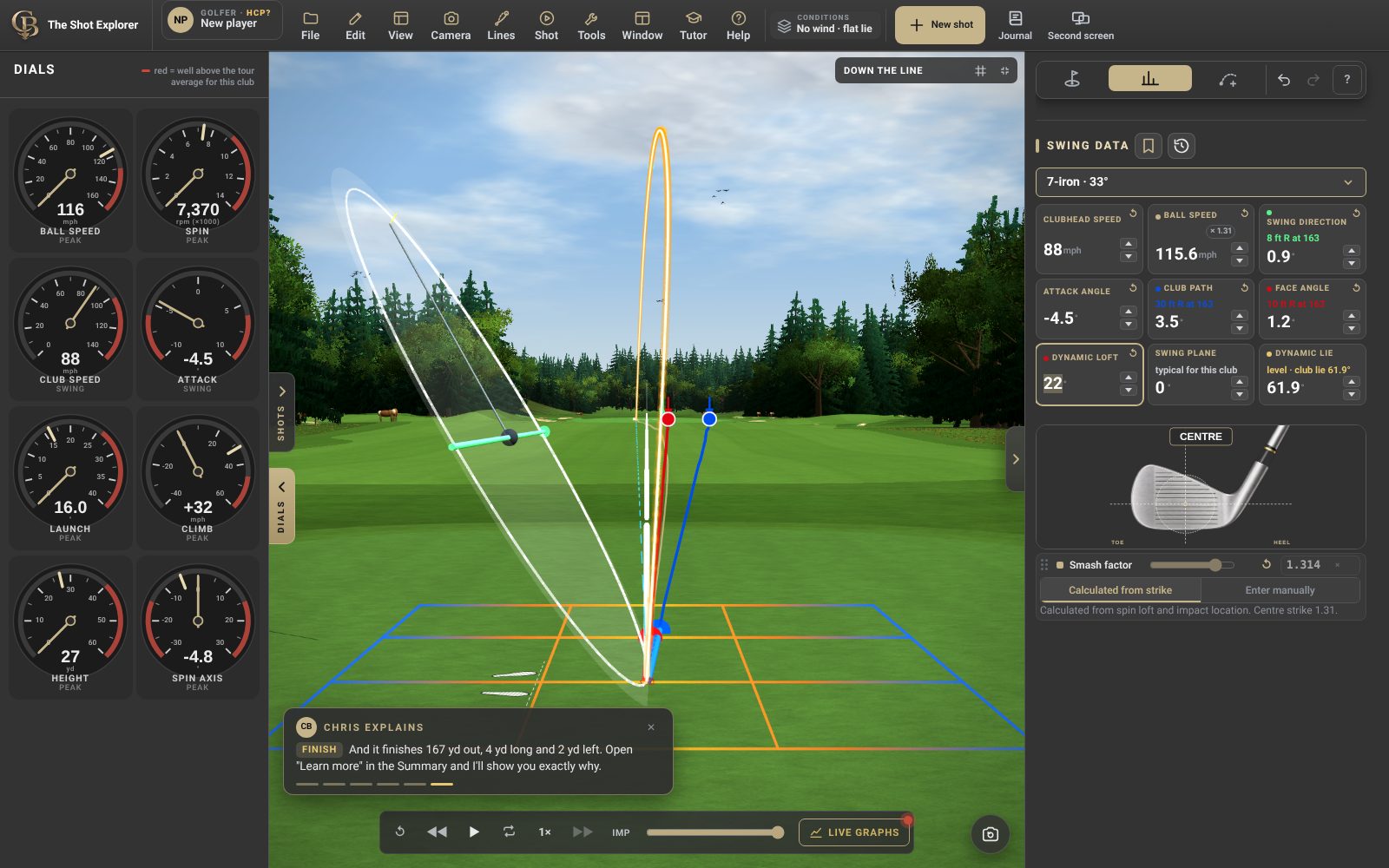
Live dials showing ball speed, spin, club speed, attack angle, launch, height and spin axis

The numbers, live, as the ball flies

Live dials show ball speed, spin, launch, height and spin axis. Live graphs draw speed, spin, height, curve and the effect of the wind through the whole flight, so you can see exactly where a shot gained or lost.
  • Uses the same direction convention as TrackMan: positive is right, for every golfer
  • Works for left-handed golfers too
  • Compare shots side by side
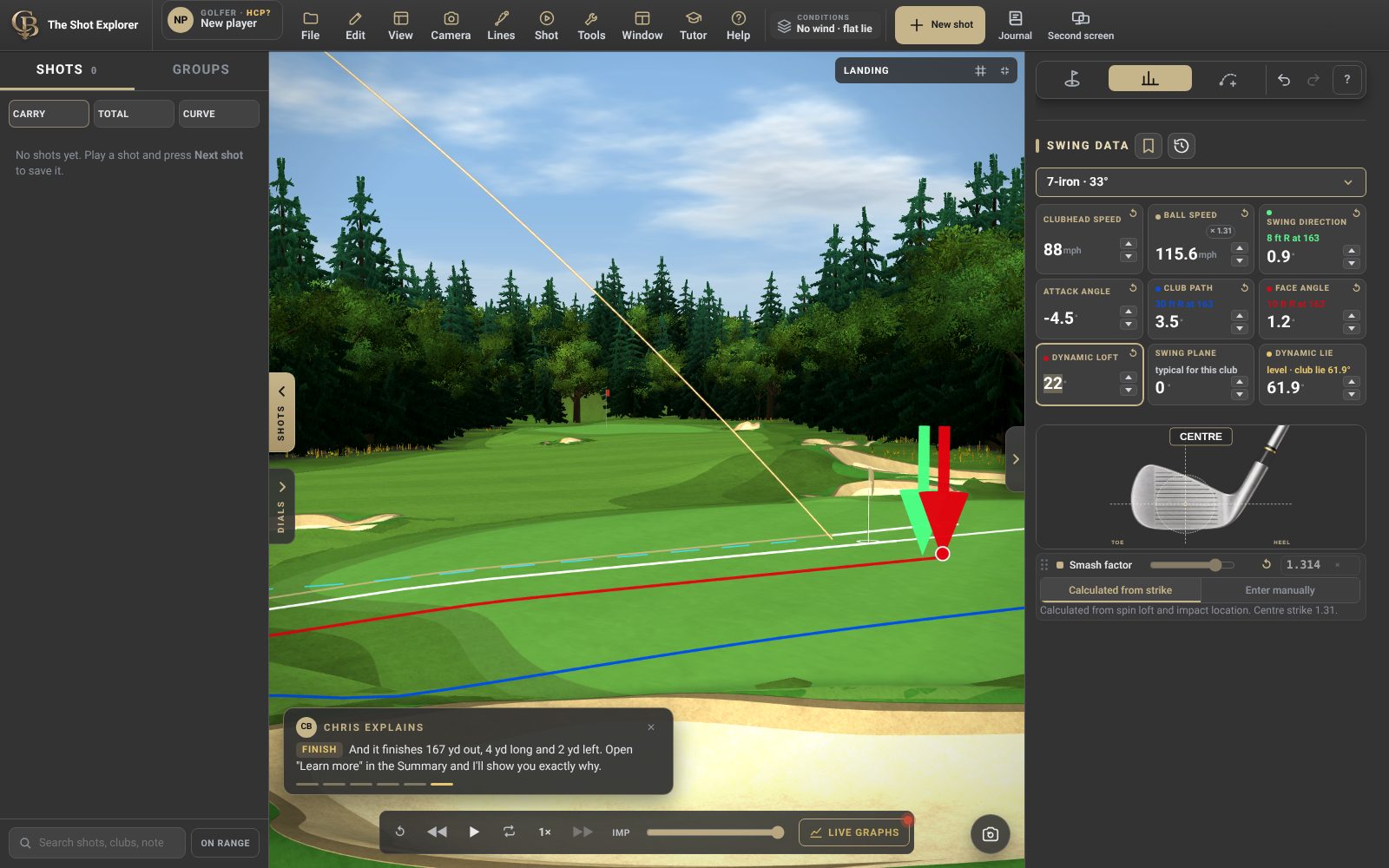
Landing view showing where the ball lands and rolls out next to a bunker

Know what to change, and by how much

This is where the Shot Explorer stops being a picture and starts being a coach. Tell it the shot you want and the Shot Tuner shows you which number to change, in which direction, and by how much.
  • Shot Tuner: what to change, and how much
  • Carry Lab: explore and predict any carry
  • Scenario Lab: test one change across every club in the bag
Side view of the ball flight arc over the fairway

Play it in the real world

A shot on a still day on a flat range is not the shot you face on the course. Add wind, temperature, altitude and humidity, set an uphill or downhill lie or the ball above or below your feet, and see how far and which way it moves.

  • Wind, slope, lie and air conditions
  • Where the strike on the face sends the ball
  • The shots a course asks for, at your level, in the weather

Built-in tutor

Finally understand why the ball curves.

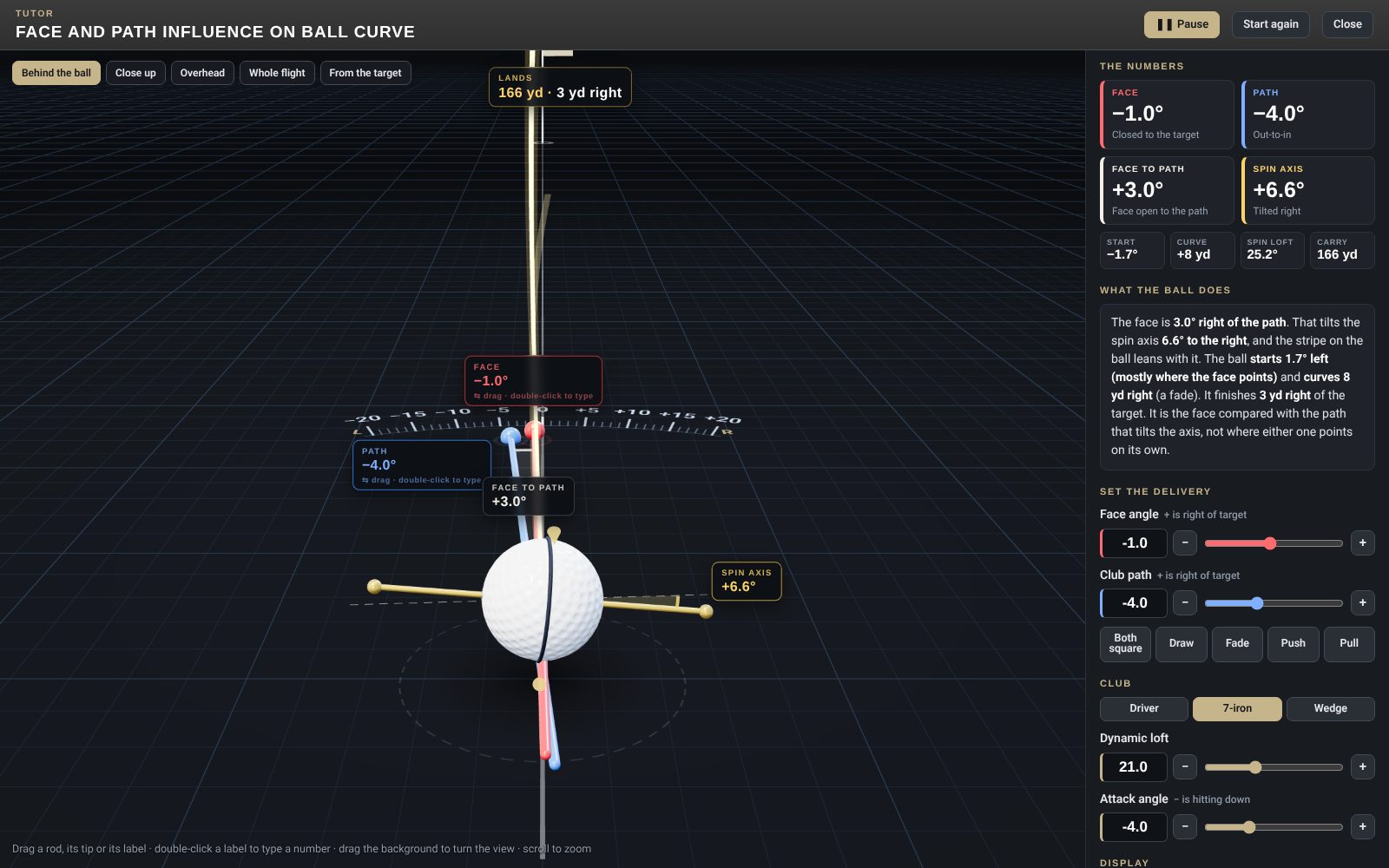
The tutor puts a spinning golf ball in front of you with a red rod for the clubface and a blue rod for the club path. Drag either one and watch the spin axis tilt and the ball bend, one degree at a time. Ten minutes with it will teach you more about ball flight than ten years of tips.
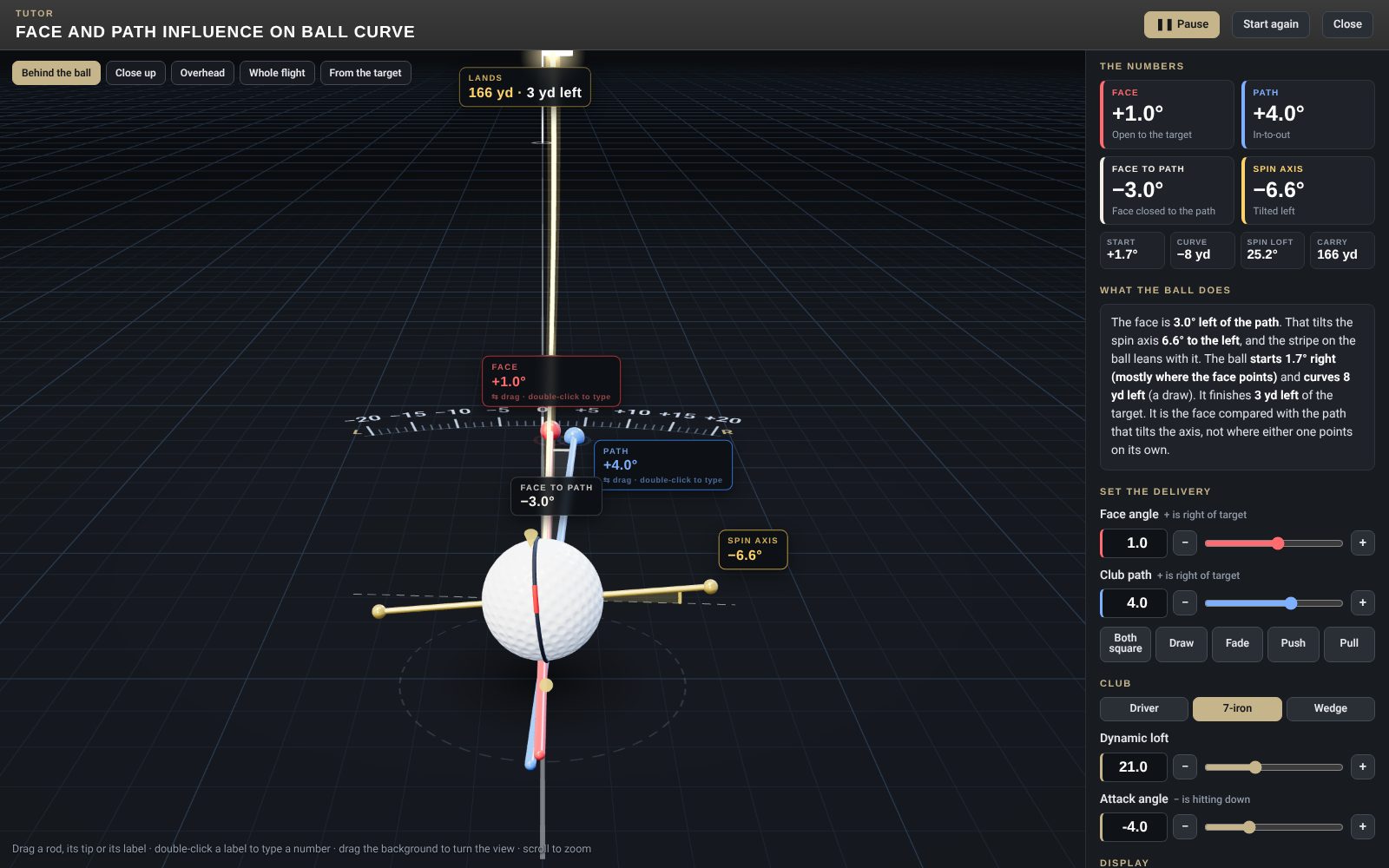
Tutor: face 1 degree right, path 4 degrees right, the ball tilts left and draws
Face right of target, path further right: the ball starts right and draws back.
Tutor: face 1 degree left, path 4 degrees left, the ball tilts right and fades
Reverse them and the same ball starts left and fades. The numbers explain why.

Everything you get

Software a coach would build for himself.

Because that’s exactly what it is. Every part of it was built to answer a question Chris gets asked in his studio.

3D ball flight

Flown from the physics of the ball, shot by shot. No tricks that make draws go further.

Chris explains

Every shot described in plain English: where it starts, how it curves and where it finishes.

Live dials and graphs

Speed, spin, launch, height, curve and wind, drawn as the ball flies.

Shot Tuner

The shot you want, and the change that gets you there.

Carry Lab and Scenario Lab

Predict any carry, and test one change through the whole bag.

Wind, slope and air

Wind, lies, temperature, altitude and humidity, all changing the flight.

Strike on the face

See how a toe or heel strike changes speed, start line and curve.

Golfer records

A golfer database with bags, sessions, groups, notes and backups, kept on your computer.

Reports

Clean printable reports to hand to a student or keep for yourself.

Second screen

Show the student the flight on a TV while you work on the laptop.

Face and path tutor

The clearest way there is to understand why a ball draws or fades.

Free updates

The program tells you when a new version is ready and installs it for you.

Who it’s for

For anyone who wants the real answer.

Golf coaches

Show students what their delivery does to the ball instead of telling them. Use it on the lesson tee, on a second screen, and in the reports you send home.

Serious golfers

Understand your own ball flight. Work out what your miss is really made of before you change a thing, and stop chasing fixes that make it worse.

Fitters and students of the game

Test loft, strike and delivery changes in seconds. Ideal for PGA trainees and anyone who wants to know the physics properly.

Chris Brook logo

Who made it

Made by Chris Brook

Chris has coached golf for 31 years, from club golfers to tour professionals, England international Jenson Bull and former Walker Cup player Lee James. He is a TrackMan Master Professional, a specialist in golf biomechanics and psychology, and the author of three books.

The Shot Explorer is the tool he wanted in his own studio: something that turns a page of numbers into a picture every golfer can understand in seconds.

More about Chris  ·  Coaching with Chris

Get it today

One price. Yours to keep.

No subscription and no monthly fee. Buy it once, download it straight away, and every update is free.

Less than a quarter of the price of one lesson.

And it’s there every time you practise, every time you watch a shot fly and every time someone asks you why the ball did that.

The Shot Explorer

£19.99one payment
  • Windows 10 and 11, and Mac (macOS 11 or later)
  • Apple silicon and Intel Macs
  • One licence, used on two of your computers
  • Works offline once it’s set up
  • Free updates, delivered inside the program
  • Report a problem straight to Chris from the Help menu
Buy now · instant download

Secure checkout by Payhip. Your licence key arrives by email straight away.

Questions

Before you buy

Do I need a launch monitor?
No. You can explore any shot by setting the numbers yourself. If you do use a launch monitor, type its numbers in and the Shot Explorer shows you what they mean and what to change.
Is it for golfers or for coaches?
Both. Golfers use it to understand their own ball flight. Coaches use it on the lesson tee, on a second screen for the student, and to keep golfer records and print reports.
What computers does it run on?
Windows 10 and 11, and Macs running macOS 11 or later, both Apple silicon (M1 and newer) and Intel. One licence works on two of your computers at the same time, for example a studio PC and a laptop.
Is it a subscription?
No. You pay £19.99 once and keep it. Updates are free: the program tells you when a new version is ready.
Does it need the internet?
Only to type in your licence key the first time, and for a quick check now and then. After that it works offline, at the range or on the course.
Does it work for left-handed golfers?
Yes. The pictures mirror for a left-handed golfer, and the numbers keep the standard convention used by launch monitors, so they always match what you see on yours.
How do I move it to a new computer?
On the old computer, open Help → Licence… and choose Remove from this computer. Then type your key in on the new one.
Installing on Windows
  1. Open The-Shot-Explorer-Setup from your Payhip download.
  2. Windows may say “Windows protected your PC”. Click More info, then Run anyway. This appears because the program is new to Microsoft, not because anything is wrong.
  3. Follow the installer, open The Shot Explorer and type in the licence key from your purchase email.
Installing on a Mac
  1. Download the version for your Mac: Apple silicon (M1 and later) or Intel. To check, open the Apple menu → About This Mac and look at “Chip” or “Processor”.
  2. Double-click the zip file, then drag The Shot Explorer into your Applications folder.
  3. Open it. The first time, the Mac says it can’t check the program for malicious software. Click Done.
  4. Open System Settings → Privacy & Security, scroll down to “The Shot Explorer was blocked”, click Open Anyway and enter your Mac password. From then on it opens normally.
  5. If the Mac says the program “is damaged”, open Terminal (Applications → Utilities), paste this line, press Return and open it again: xattr -cr "/Applications/The Shot Explorer.app"
Something isn’t working. What do I do?
In the program, choose Help → Report a problem. It sends Chris a report with everything he needs to fix it. You can also email chris@chrisbrook.co.uk.

The Shot Explorer

Stop guessing. See it.

Every shot you hit has a reason. Now you can see it.

  • Windows and Mac
  • Pay once
  • Free updates
The Shot Explorer · £19.99Buy now